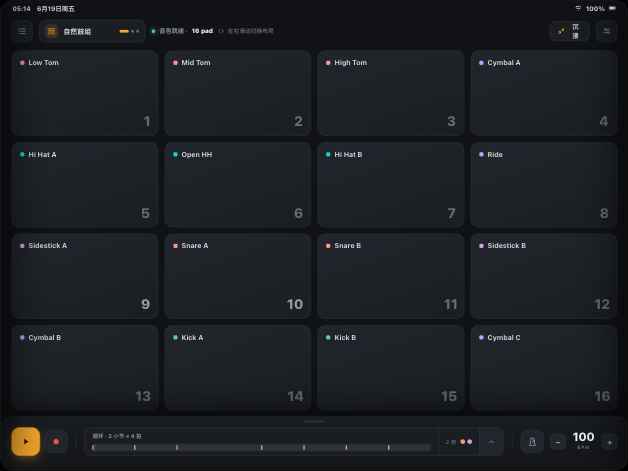
在 16 个鼓垫上开奏,跟着一小节基础节奏熟悉左右手,再导入喜欢的歌做 AI 人声、鼓与伴奏分轨。多轨、鼓谱草案和音序器都留在同一个创作流程里。Start on 16 pads, follow one-bar basic rhythms with left/right-hand cues, then import a song for AI vocal, drum, and backing stems. Multitrack arranging, drum-chart drafts, and the sequencer stay in one workflow.
面向 iOS 与 Android 的横屏演奏体验;商店可用性以正式商店页面为准。A landscape playing experience for iOS and Android; store availability is shown only on official store listings.
16鼓垫pads
4已编排布局arranged layouts
8一小节基础节奏one-bar basic rhythms
3App 内 AI 音轨AI stems in the App
核心功能Core features
为演奏而设计的每一处细节Every detail tuned for play
下面每一项都对应当前 App 中可操作的入口,不用评分、下载量或概念功能代替产品证据。Every item below maps to a workflow available in the current App—no ratings, download counts, or concept-only features standing in for product evidence.
16 鼓垫 · 四套布局16 pads · four layouts
Acoustic、Electronic、Hip-Hop 与 Rock 四套 4×4 布局已经编排好,也能编辑 pad 音色、颜色和位置。Acoustic, Electronic, Hip-Hop, and Rock arrive as four arranged 4×4 layouts, with editable pad sounds, colors, and positions.
4 × 4 · 可编辑布局4 × 4 · editable layouts
基础节奏引导Basic rhythm guidance
8 条一小节基础节奏配有左右手/手指提示和播放高亮,可按 ±5 调 BPM,先把一段 groove 跟熟。Eight one-bar patterns include left/right-hand and finger cues with playback highlighting. Adjust BPM in ±5 steps and learn one groove at a time.
无评分 · 无进度系统No scoring · no progress system
本地文件与采样导入Local files & sampling
从系统文件选择器导入歌曲,也可录制最多 5 秒的麦克风采样或给 pad 导入 WAV / MP3 / FLAC。iOS 自定义采样可随 iCloud 同步。Import songs through the system file picker, record up to five seconds with the microphone, or load WAV / MP3 / FLAC onto a pad. On iOS, custom samples may sync through iCloud.
普通导入不会自动触发 AI 上传Ordinary import does not start AI upload
AI 三分轨与鼓谱草案Three AI stems & chart draft
登录并主动开始 AI 分析后,把歌曲分成人声、鼓与伴奏三条 App 内音轨,同时检测 BPM 并生成需要试听核对的鼓谱草案。After signing in and actively starting AI analysis, split a song into vocal, drum, and backing stems in the App, detect BPM, and create a drum-chart draft to review by ear.
打击乐、旋律、歌曲与 AI stem 在同一工程中独立静音、独奏、调节音量,并与循环走带一起播放。Percussion, melody, song, and AI-stem tracks live in one project with independent mute, solo, and volume controls alongside the loop transport.
打击乐 · 旋律 · 音乐轨Percussion · melody · music
步进音序器Step sequencer
在全屏网格里添加或移动每一击,编排打击乐与旋律轨,并调整分辨率、长度和每轨循环小节数。Add or move individual hits in a full-screen grid, arrange percussion and melody tracks, and adjust resolution, note length, and per-track loop bars.
逐步编辑 · 多轨编排Step editing · multitrack arranging
界面一览Inside the app
清晰的层级,顺手的流程Clear hierarchy, fluid flow
Acoustic Kit演奏Play
控制台 · 16 鼓垫Console · 16 pads
4×4 网格配合底部走带,适合横屏双手演奏。A 4×4 grid and bottom transport support two-hand landscape playing.
采样中Sampling
0:02 / 0:05
麦克风采样器Microphone sampler
选 pad → 录制(最多 5 秒)→ 试听装载;iOS 上自定义采样可随 iCloud 同步。Pick a pad → record (up to five seconds) → audition and load; custom samples may sync through iCloud on iOS.
循环图层Loop layers100 BPM
Kick
Snare
Hat
鼓机 Deck · 叠层时间线Drum deck · layer timeline
每个 overdub 录音层独立成条,可单独撤销。Each overdub becomes its own track, undoable on its own.
底层引擎Under the hood
为演奏响应而设计的 原生音频核心A native audio core designed for responsive play
pad 在落指时触发,Dart 通过 FFI 调用 C 音频核心,再由 miniaudio 输出。App 会向系统请求低延迟配置,但实际端到端延迟取决于设备、系统、音频路由与当前负载,因此不宣传固定毫秒数。Pads trigger on finger-down; Dart calls a C audio core over FFI, then miniaudio outputs the sound. The App requests a low-latency configuration, but end-to-end latency depends on device, OS, audio route, and current load, so we do not claim a fixed millisecond figure.
C原生音频核心native audio core
32voice 复音池voice pool
FFIDart 直达核心Dart-to-core bridge
↓落指触发finger-down trigger
信号链路Signal chain
1onTapDown落指即触发,不等 tap 完成fires on finger-down, not tap-up
2Dart → FFI直接调用,无中间层direct call, no middle layer
3C core复音池调度voice-pool scheduling
4miniaudio按设备能力配置输出output configured for device capability
FAQ
常见问题Common questions
不会。当前提供 8 条一小节节奏、左右手/手指提示、播放高亮和可调 BPM,没有击打准确度、评分、课程进度或连续打卡。No. The current feature has eight one-bar rhythms, left/right-hand and finger cues, playback highlighting, and adjustable BPM. It does not measure hit accuracy, score playing, track course progress, or maintain streaks.
麦克风采样不会触发 FingerDrum 的 AI 后端上传;但在 iOS 上,自定义采样可写入你的 iCloud Documents 并由 Apple 同步。详见隐私协议。Microphone sampling does not trigger an upload to FingerDrum's AI backend. On iOS, however, custom samples may be written to your iCloud Documents and synced by Apple. See the Privacy Policy.
可以。歌曲导入支持 MP3、M4A、AAC、WAV、AIFF、CAF 与 FLAC;pad 音色可导入 WAV、MP3 或 FLAC。普通导入不会自动启动 AI 上传。Yes. Song import supports MP3, M4A, AAC, WAV, AIFF, CAF, and FLAC; pad sounds accept WAV, MP3, or FLAC. Ordinary import does not automatically start AI upload.
FingerDrum 面向 iOS 与 Android 手机及平板实现,界面锁定横屏并针对平板演奏优化。公开商店可用性以正式商店页面为准。FingerDrum is implemented for iOS and Android phones and tablets, with a landscape-only interface tuned for tablet playing. Public availability is shown only on official store listings.
pad 在落指时触发,音频走 Dart → FFI → C 核心 → miniaudio。App 请求低延迟配置,但实际延迟随设备和音频路由变化,因此不承诺固定毫秒数。Pads trigger on finger-down and audio flows through Dart → FFI → a C core → miniaudio. The App requests low-latency settings, but actual latency varies by device and audio route, so no fixed millisecond figure is promised.